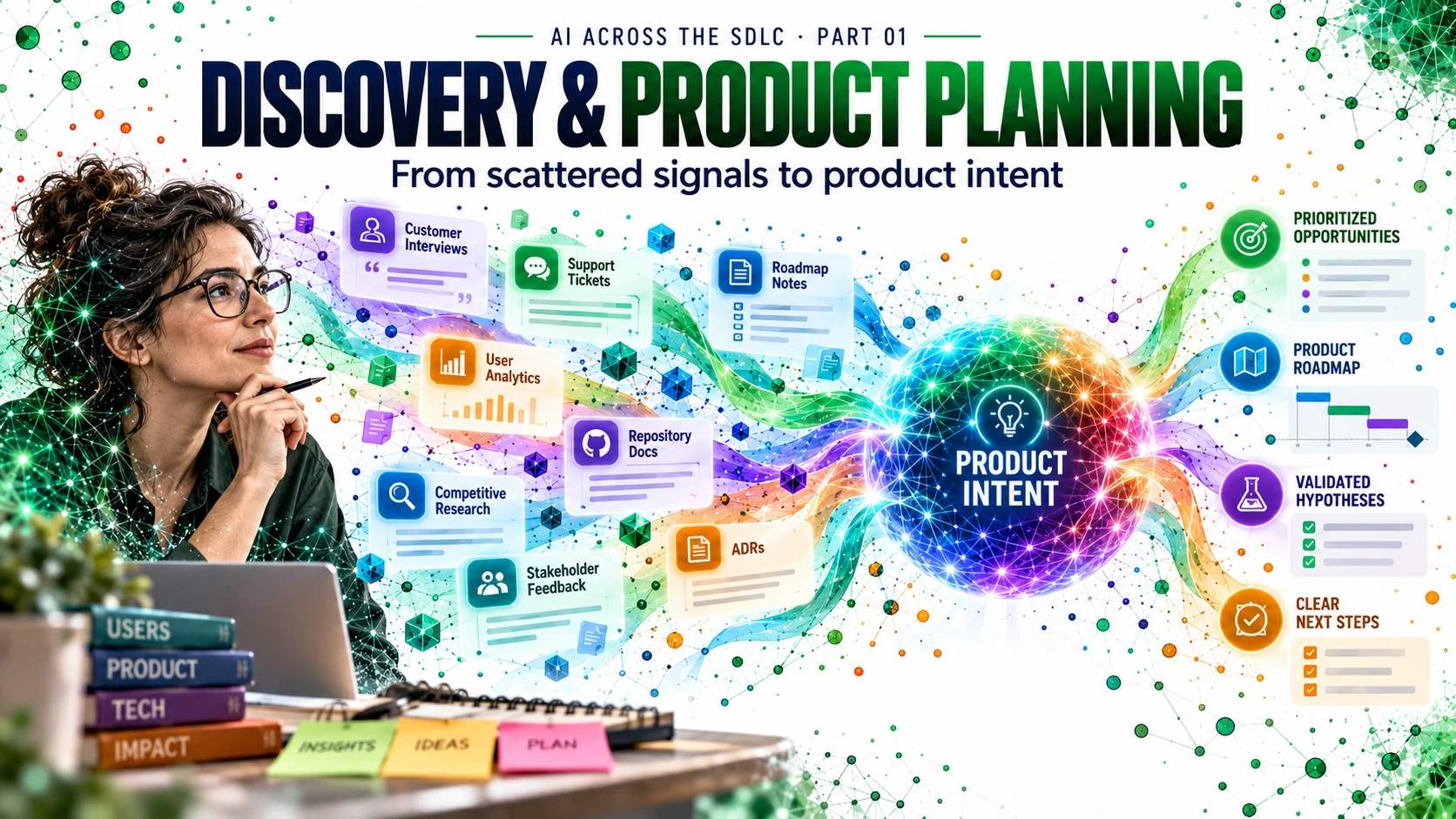
Before AI helps us build better software, it should help us understand what should be built — and why.
In the introductory map for this series, the SDLC was presented as a lifecycle that can be progressively transformed by GitHub Copilot products, AI assets, knowledge, controls, and feedback loops. This first installment starts at the beginning: product discovery.
The practical challenge is simple, but foundational:
How do we transform scattered signals — interviews, support tickets, roadmap notes, existing documentation, and architecture constraints — into a clean, evidence-based understanding of what should happen next?
In this post, the running example is CaseFlow, a Rails-based product used to manage operational cases. The discovery topic is an apparently straightforward request: SLA-based escalation. The trick is that we do not want to jump directly from request to implementation. We first want product intent.
Contents
- Why discovery matters in an AI-enabled SDLC
- The first shift: initialize context only when needed
- From signals to product intent
- Evidence, inference, and unknowns
- Discovery workflow in context
- A simple lab with CaseFlow
- Support material included in this package
- References
Why discovery matters in an AI-enabled SDLC
It is tempting to think of AI as an implementation accelerator. But a weak understanding of the problem simply leads to faster mistakes.
Discovery is where we decide whether a request is:
- a real problem,
- a pattern across multiple signals,
- aligned with product direction,
- constrained by existing architecture,
- or still too ambiguous to become backlog work.
That is why discovery is a strong place to begin introducing AI assets.
In this phase, the most relevant building blocks are:
- Instructions — how the assistant should behave during discovery;
- Discovery Skill — a reusable method for synthesizing signals;
- Product Discovery Agent — a role-oriented way to analyze the problem;
- Product Knowledge / early RAG — the relevant product context gathered from the repository and support materials;
- MCP (optional) — useful if discovery must reach external tools or data sources.
The goal is not code. The goal is a discovery report that creates a reliable bridge to backlog shaping.
The first shift: initialize context only when needed
A practical pattern for this series is to introduce Copilot commands and shifts when they become useful.
Discovery is one of those moments.
Before asking the assistant to analyze a product request, it often helps to first improve its understanding of the repository and surrounding project context. In practice, that may mean using copilot init or an IDE-centered /init workflow if repository understanding still feels shallow or fragmented.
The principle is straightforward:
Use initialization when context is incomplete, not as a ritual.
In the CaseFlow example, repository context matters because discovery is not purely business-facing. The repository and support materials already contain clues about architecture, conventions, dependencies, constraints, and prior decisions.
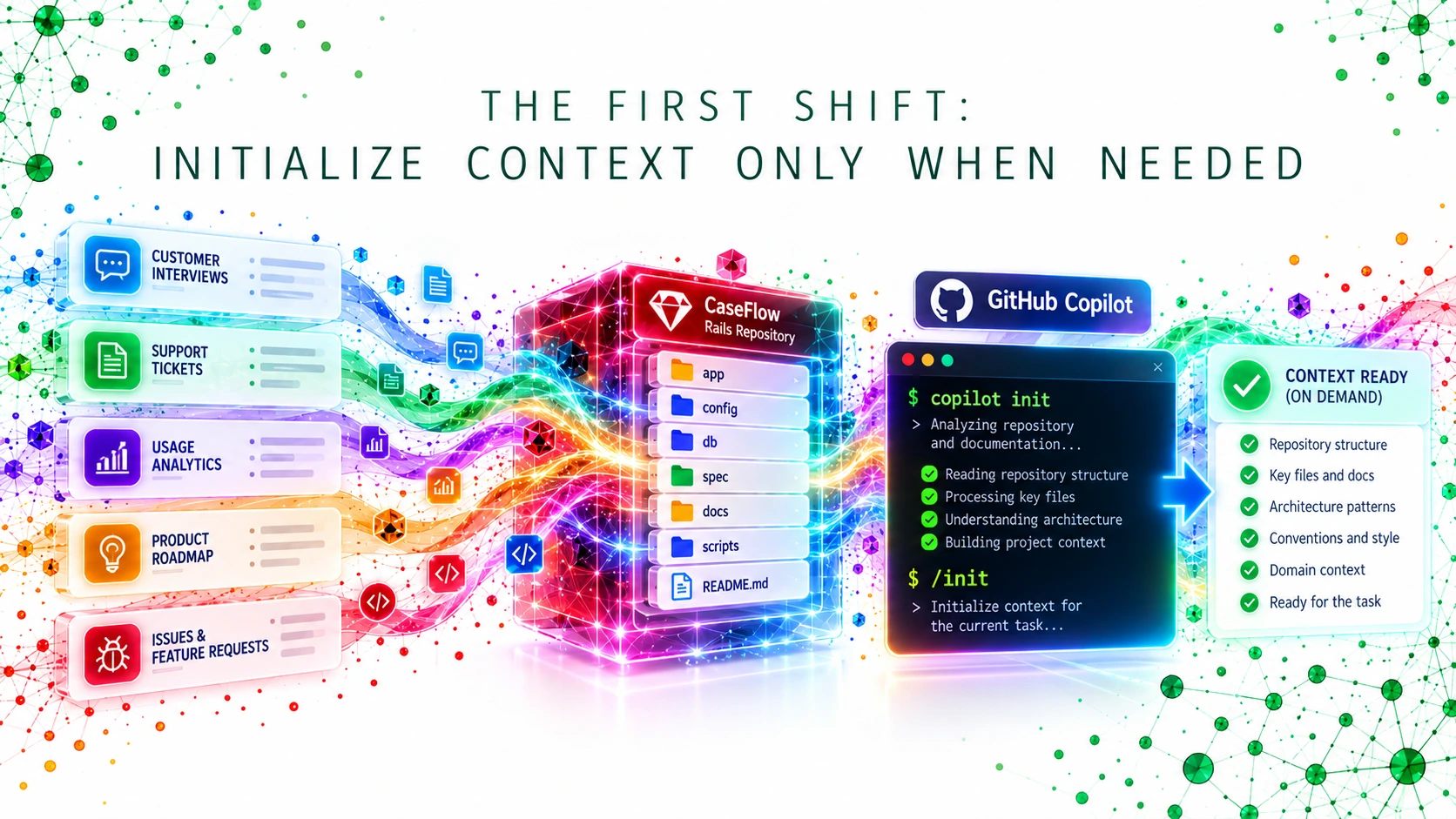
A useful mental checklist after initialization is:
- Does Copilot understand the repository structure?
- Does it see the most relevant product and architecture documents?
- Does it know the main conventions and recurring workflows?
- Can it identify the parts of the product that matter to the current discovery topic?
If the answer is still weak, discovery analysis will also be weak.
From signals to product intent
For this first post, the CaseFlow request is: add SLA-based escalation.
At first glance, that sounds implementation-ready. But in discovery we are still answering questions like:
- Is the underlying problem clearly stated?
- What signals support the request?
- Which product outcomes might it improve?
- Which constraints or trade-offs already exist?
- What should be clarified before backlog creation?
That is why “signals” matter.
Typical sources include:
- customer interviews,
- support tickets,
- product vision,
- roadmap notes,
- existing documentation,
- architecture decision records,
- and current system context.
The point of AI in this phase is to connect those sources, not simply summarize them in isolation.
A useful output is product intent — a concise, evidence-based view of the problem, its context, and the most justified next step.
Evidence, inference, and unknowns
This is the most important intellectual discipline in the whole article.
Bad discovery often happens because conclusions are not labeled clearly enough. A team begins with vague signals, and then treats inference as fact.
A useful discovery workflow should always distinguish:
- Observed / evidence — what the sources actually say;
- Inference — what appears likely, and why;
- Unknowns — what is still unclear and should block premature certainty.
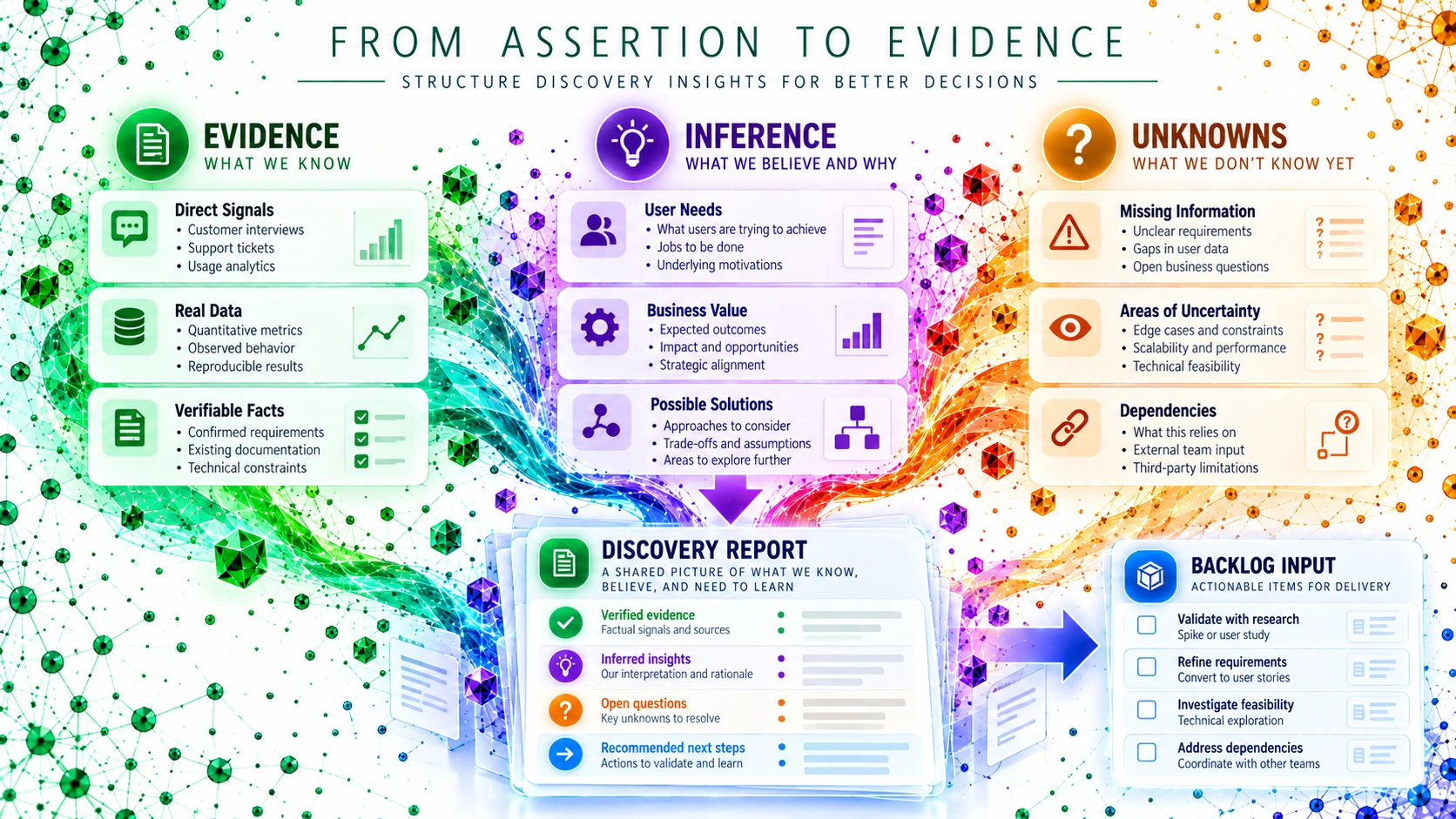
This approach makes the discovery report far more trustworthy. It also makes later product and engineering conversations healthier, because assumptions remain visible instead of hiding inside apparently confident statements.
Discovery workflow in context
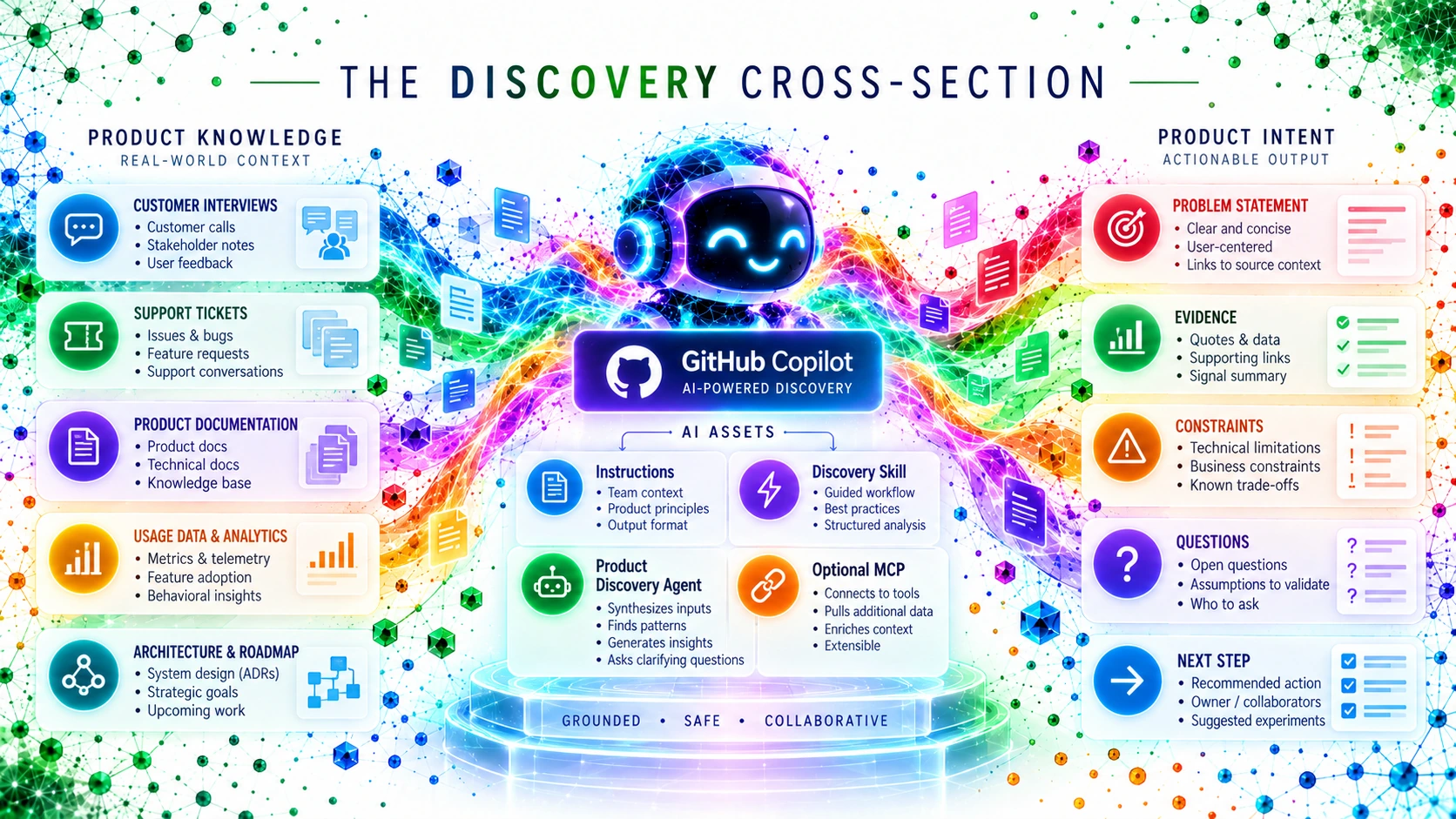
Once we step back, discovery becomes a coordination point between several layers:
- product knowledge sources on the left,
- GitHub Copilot products in the middle,
- AI assets below,
- and a cleaner product intent output on the right.
At this phase, GitHub Copilot can help through different surfaces:
- Copilot in the IDE for focused exploration inside the repository;
- Copilot Chat for questioning, reframing, and comparing findings;
- GitHub Copilot CLI for structured investigation in a local project context;
- GitHub Copilot App when broader workspace-level context helps discovery.
The key is not to use every product at once. It is to use the right surface for the kind of reasoning the moment requires.
A simple lab with CaseFlow
This package includes a small support lab around CaseFlow.
The discovery topic is SLA-based escalation. The support materials include:
- product vision and roadmap,
- personas,
- synthetic customer interviews,
- support tickets,
- a feature request,
- system overview,
- ADRs,
- discovery instructions,
- a reusable Discovery Skill,
- a Product Discovery Agent definition,
- a discovery report template,
- and a sample discovery report.
A good exercise is:
Ask Copilot to analyze the CaseFlow discovery materials and produce a discovery report for SLA-based escalation. The report must explicitly distinguish observed evidence, inferred insights, and unknowns.
A strong result should make it easy to answer:
- Is the request justified?
- What is already supported by evidence?
- What remains unclear?
- Should the next action be a user story, a spike, or a follow-up discovery step?
Support material included in this package
The complete companion lab is available as a downloadable package:
It includes:
- product vision, roadmap, and personas;
- synthetic customer interviews, support tickets, and a feature request;
- CaseFlow architecture notes and ADRs;
- discovery instructions;
- a reusable Discovery Skill;
- a Product Discovery Agent;
- exercises and suggested answers;
- discovery-report template and sample answer.
The lab is intentionally lightweight. Its purpose is not to simulate an entire enterprise system yet, but to establish a repeatable discovery discipline that later posts can build on.
References
-
GitHub Docs — Get started with GitHub Copilot
https://docs.github.com/en/copilot/get-started -
GitHub Docs — Chat in the IDE with GitHub Copilot
https://docs.github.com/en/copilot/how-tos/chat-with-copilot/chat-in-ide -
GitHub Docs — About GitHub Copilot CLI
https://docs.github.com/en/copilot/concepts/agents/copilot-cli/about-copilot-cli -
GitHub Docs — Customize GitHub Copilot CLI
https://docs.github.com/en/copilot/how-tos/copilot-cli/customize-copilot -
GitHub Docs — About the GitHub Copilot app
https://docs.github.com/en/copilot/concepts/agents/github-copilot-app -
GitHub Docs — Model Context Protocol
https://modelcontextprotocol.io/ -
Series context — AI Across the SDLC with GitHub Copilot
../2026-09-29-ai-across-the-sdlc-with-github-copilot.html