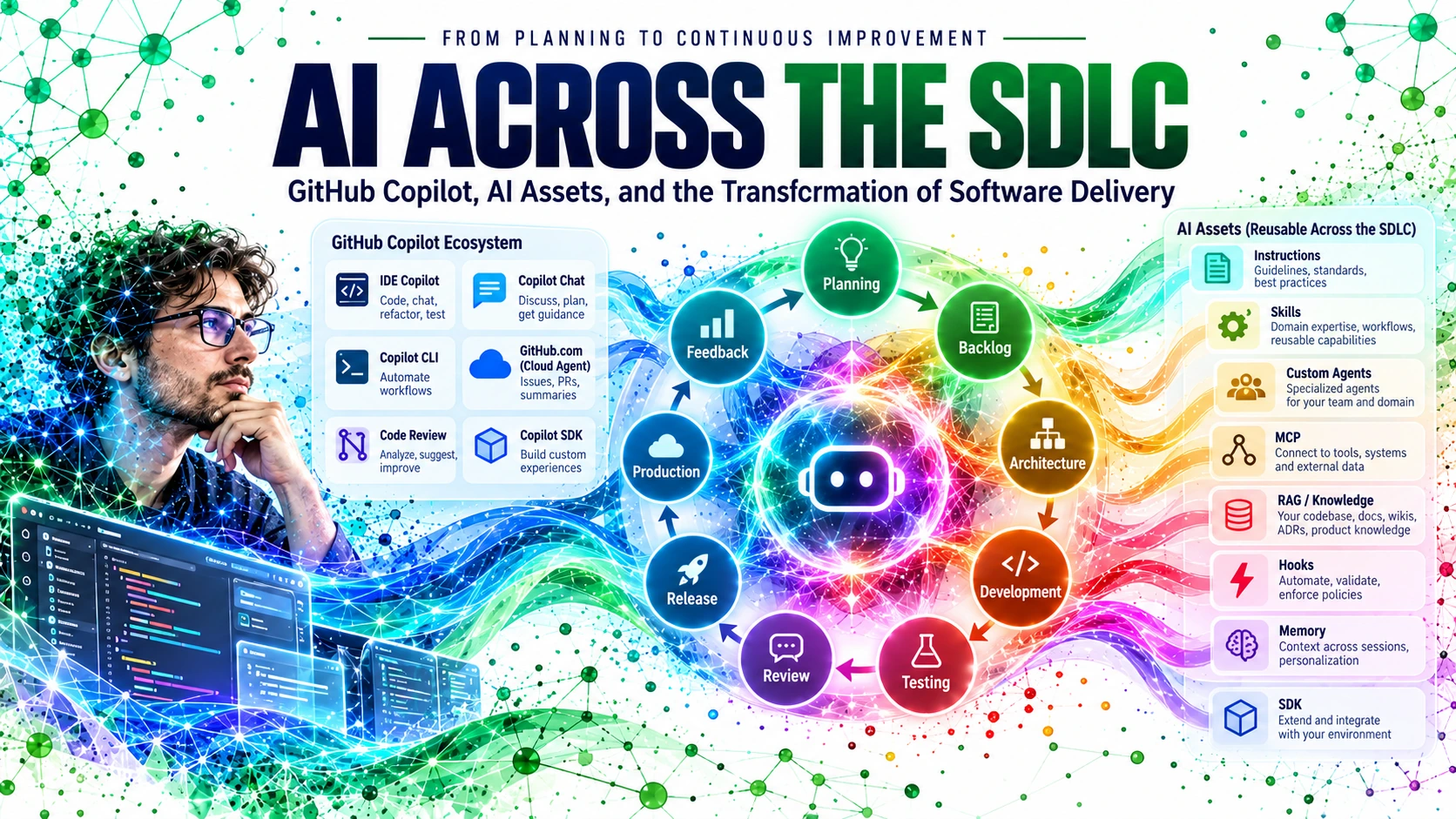
AI transformation is not a Copilot button. Applied AI happens inside SDLC activities; transformation happens when those capabilities become reusable, governed, measurable, and connected across the lifecycle.
GitHub Copilot began, for many developers, as a faster way to complete a line of code. That mental model is now too small.
The useful unit is no longer only code generation. It is the software-delivery system around the code: discovery, planning, architecture, implementation, testing, review, release, production, incident response, learning, and the knowledge that connects one cycle to the next.
This article is the introduction to a larger series. The companion infographic maps the lifecycle in ten pages: an overview followed by discovery, sprint planning, architecture, development, testing, review, release, production, and continuous improvement. Download the source infographic.
The central question is:
How do GitHub Copilot products and reusable AI assets fit together when the goal is not merely “use AI while coding,” but apply AI throughout the SDLC and use those applications as building blocks for a broader AI Transformation?
Contents
- Applied AI and AI Transformation are related, but not identical
- The transformation is larger than the editor
- The GitHub Copilot product landscape
- HydraFusion: runtime multi-model orchestration
- Three things that must not be confused
- A practical model of the Copilot ecosystem
- Where AI fits across the SDLC
- What each AI asset actually does
- RAG is knowledge; MCP is access
- From local customization to organizational capability
- Hooks, review, and the return of determinism
- From AI-assisted to AI-native
- The series roadmap
- Closing the loop
- References
Applied AI and AI Transformation are related, but not identical
The identification of Skills, Agents, RAG, MCP, Hooks, Instructions, Memory, SDK, and related assets inside SDLC phases is best understood first as Applied AI: concrete uses of AI to improve a planning activity, architecture decision, development task, test workflow, review, deployment, or incident investigation.
AI Transformation is the larger organizational change that makes those applications repeatable and systemic.
Applied AI asks:
Where can AI improve this activity?
AI Transformation asks:
How do we make those capabilities reusable across teams, governed by policy, connected to organizational knowledge, measurable through engineering outcomes, and continuously improved?
This distinction strengthens the model rather than replacing it. The SDLC map describes where AI is applied; the transformation model describes how those applications become an organizational capability.
The transformation is larger than the editor
The familiar picture of Copilot is a developer inside an IDE asking for code, explanations, tests, or refactors. That remains useful, but the current GitHub Copilot ecosystem extends far beyond that interaction.
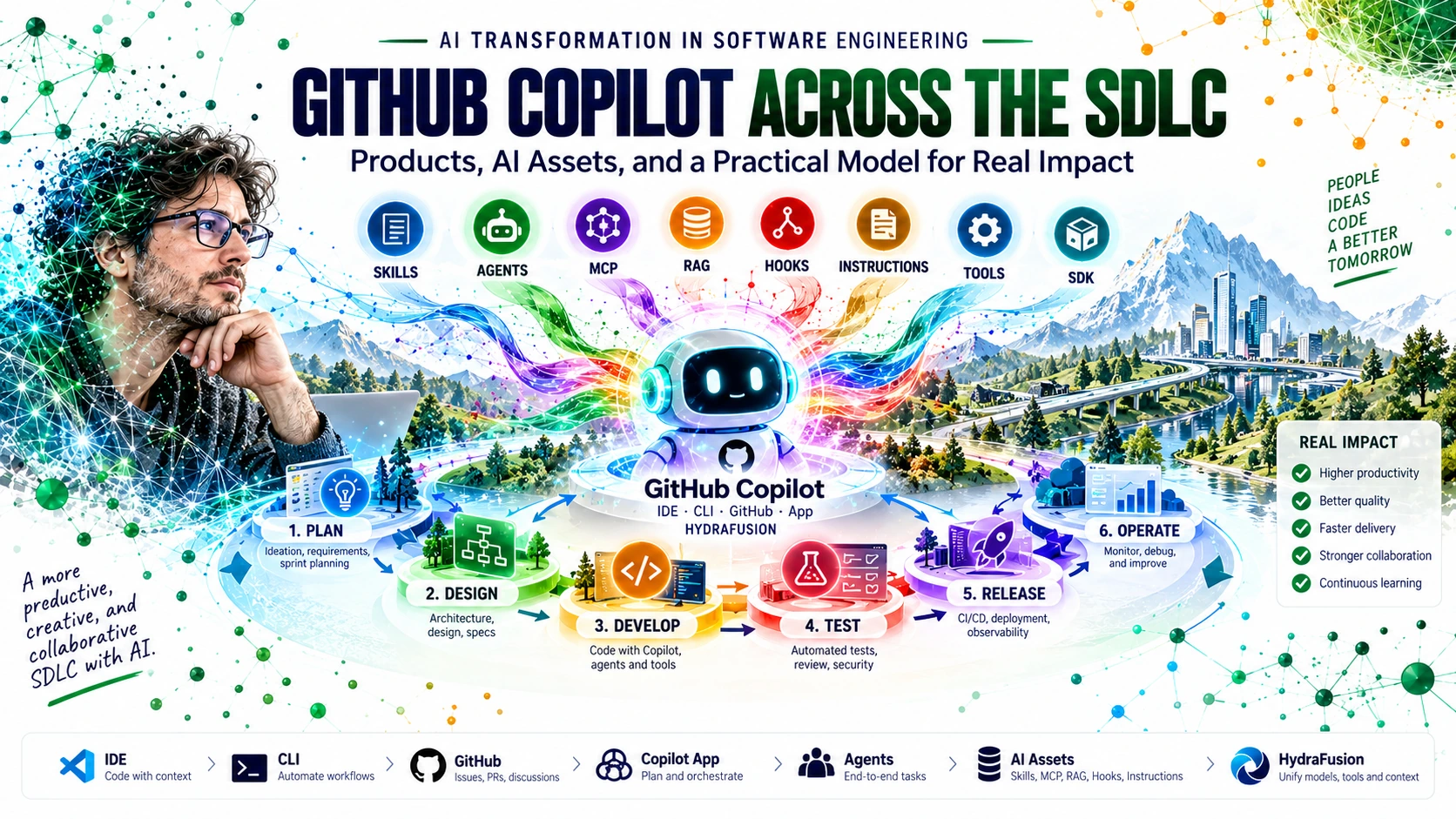
Copilot can participate locally in an IDE or terminal, asynchronously in the cloud, in pull-request review, inside a dedicated desktop application, and programmatically through an SDK. GitHub CLI can also start and track Copilot cloud-agent sessions using gh agent-task, which is distinct from the separate GitHub Copilot CLI.
That distinction matters:
GitHub CLI          = gh, the GitHub platform CLI
GitHub Copilot CLI  = the local agentic Copilot terminal experience
The result is an ecosystem in which the same knowledge, skills, tools, and controls can support different moments of delivery.
The GitHub Copilot product landscape
For this series, it is useful to separate official GitHub Copilot products/surfaces from reusable assets and from adjacent orchestration concepts.
| Product or surface | What it contributes to the SDLC |
|---|---|
| GitHub Copilot in the IDE | Suggestions, Chat, Ask/Plan/Agent workflows, code edits, tests, explanation, repository work |
| GitHub Copilot CLI | Local agentic work from the terminal: inspect, modify, run commands, delegate to subagents, use skills, hooks and MCP |
GitHub CLI (gh) |
GitHub platform CLI; can start and track Copilot cloud agent sessions using gh agent-task
|
| GitHub Copilot app | Desktop application for parallel agent workstreams, GitHub issues/PRs, automations, canvases, local repositories and cloud sandboxes |
| GitHub Copilot cloud agent | Asynchronous agent that can research a repository, make changes and create pull requests in cloud environments |
| GitHub Copilot code review | AI-assisted PR review on GitHub and supported development surfaces |
| GitHub Copilot SDK | Programmatic foundation for building custom Copilot-powered applications, agent sessions and integrations |
| GitHub MCP Server / MCP integrations | Connect Copilot-capable clients and agents with GitHub and external tools/data through MCP |
| Project HydraFusion (Research Preview) | Adaptive multi-model runtime orchestration in Copilot CLI; selects Single, Cascade, or Critique workflows |
| GitHub Mobile / GitHub.com entry points | Additional places to start, monitor or interact with cloud-agent work |
GitHub’s current documentation explicitly describes the GitHub Copilot app as built on Copilot CLI and the Copilot SDK, and describes the cloud agent as accessible from GitHub, IDEs, REST API, GitHub CLI, GitHub MCP Server, mobile, and several external work systems.
HydraFusion: runtime multi-model orchestration
Project HydraFusion is an official GitHub Copilot research preview for adaptive multi-model runtime orchestration. GitHub introduced it in September 2026 as a runtime layer that creates an execution plan and can choose among models from multiple providers according to the task.
HydraFusion is currently available through GitHub Copilot CLI as an experimental model option. A developer enables experimental features, selects HydraFusion (Research Preview), and then interacts with Copilot normally while the orchestration happens behind the scenes.
Its role is different from Skills, Agents, MCP, Hooks, or Instructions. Those are reusable capabilities, context mechanisms, integrations, or controls. HydraFusion sits closer to the agentic runtime and model-selection layer.
A useful mental model is:
HydraFusion currently selects one of three execution patterns:
- Single — one selected model solves the task directly.
- Cascade — an efficient model drafts first; a quality gate decides whether to accept or escalate to a stronger model.
- Critique — one model drafts, an independent read-only critic from another model family reviews, and the drafting model revises once.
The point is not merely model choice. GitHub describes HydraFusion as runtime orchestration: it dynamically constructs the workflow expected to meet a quality target while balancing performance, latency, and cost.
For this SDLC series, that makes HydraFusion relevant mainly where substantial agentic work happens—development, debugging, code transformation, testing, investigation, and other tasks in which the runtime can benefit from choosing a compound workflow rather than a single-model response.
Because it is still a research preview, the article should not treat its current behavior, availability, model pool, or workflows as fixed production contracts.
Three things that must not be confused
A lot of AI adoption becomes confusing because product surfaces, AI assets, and organizational knowledge are mixed together.
They are related, but they are not the same thing.
1. Product surfaces
These are places where people or systems interact with Copilot: IDE, GitHub Copilot CLI, GitHub CLI entry points to the cloud agent, GitHub Copilot app, GitHub.com, cloud-agent APIs, code review, and custom experiences built with the Copilot SDK.
A surface answers: Where does the interaction or execution happen?
2. AI assets
These are reusable pieces of behavior, capability, or control:
- custom instructions;
- skills;
- custom agents;
- hooks;
- MCP configurations;
- plugins;
- prompts and prompt files;
- reusable policies and evaluation routines.
An asset answers: What behavior, capability, or constraint should be reusable?
3. Knowledge and context
This includes:
- repository source;
- architecture documentation;
- ADRs;
- runbooks;
- tickets;
- standards;
- product documentation;
- organizational knowledge bases;
- Copilot Memory where supported;
- retrieved context through RAG-style systems.
Knowledge answers: What should the AI know for this task?
This separation is one of the foundations of an AI architecture. A team that stores everything in one giant prompt has not created a reusable capability model; it has created a fragile conversation.
A practical model of the Copilot ecosystem
A useful way to reason about GitHub Copilot is as a set of layers.
Human intent enters through a product or execution surface. That surface assembles context from the repository, instructions, memory, skills, and available knowledge. Agents reason over the task. MCP can expose tools and external systems. Hooks can introduce deterministic checks or automation at lifecycle points. Tests, code review, CI results, runtime telemetry, and human decisions become evidence.
The result is not simply “AI generated code.”
It is:
Intent → surface → context → reasoning → tools → controls → evidence → learning.
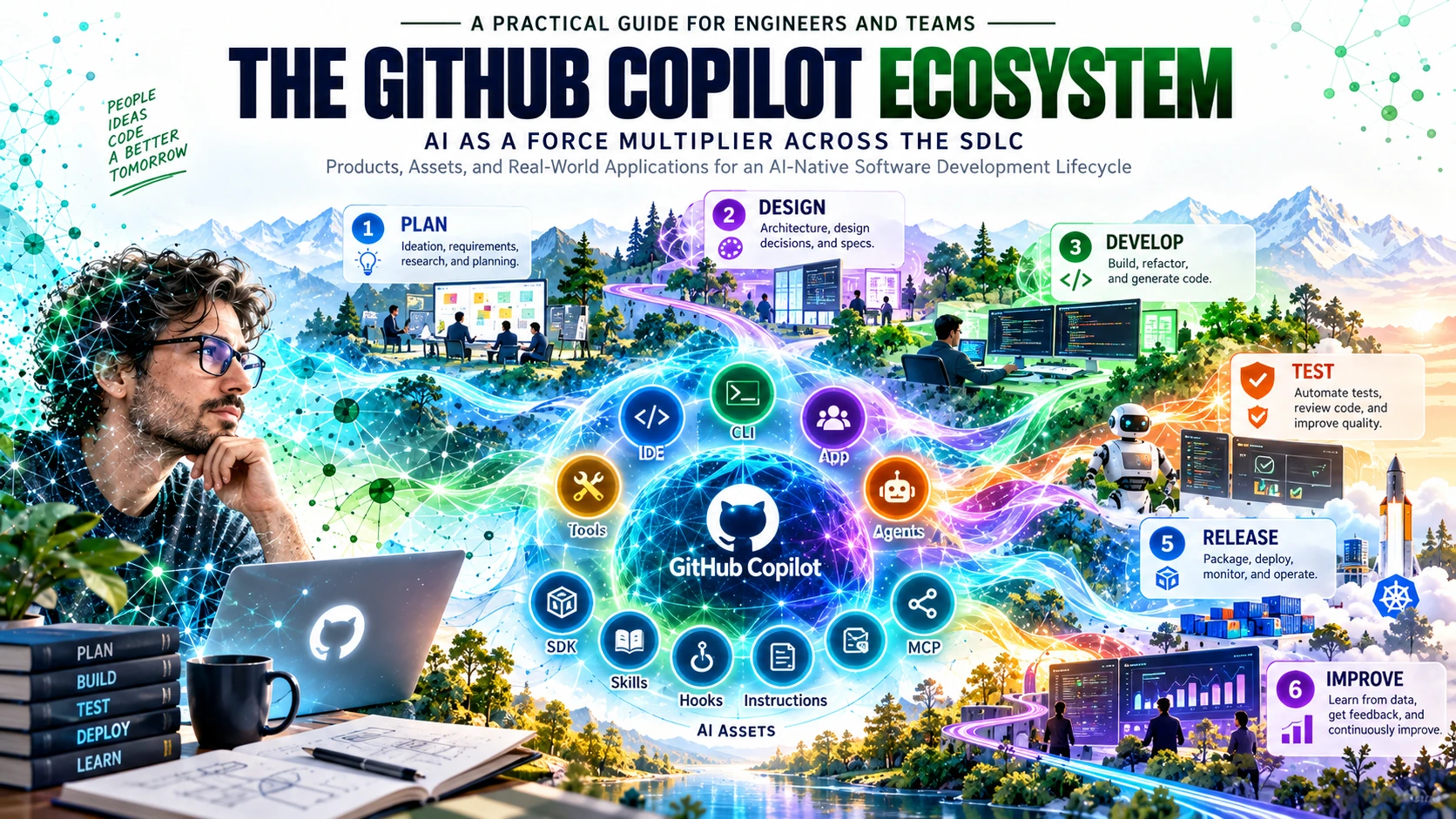
GitHub’s Copilot CLI customization model currently includes custom instructions, hooks, skills, custom agents, MCP servers, plugins, and settings. Copilot Memory provides persistent repository understanding, and the Copilot SDK makes agent sessions and capabilities programmable.
This is a shift from “AI assistant” toward programmable agentic infrastructure.
Where AI fits across the SDLC
The companion infographic divides the lifecycle into a beginning, a middle, and what happens after release. That framing is useful because it prevents AI from being reduced to implementation.
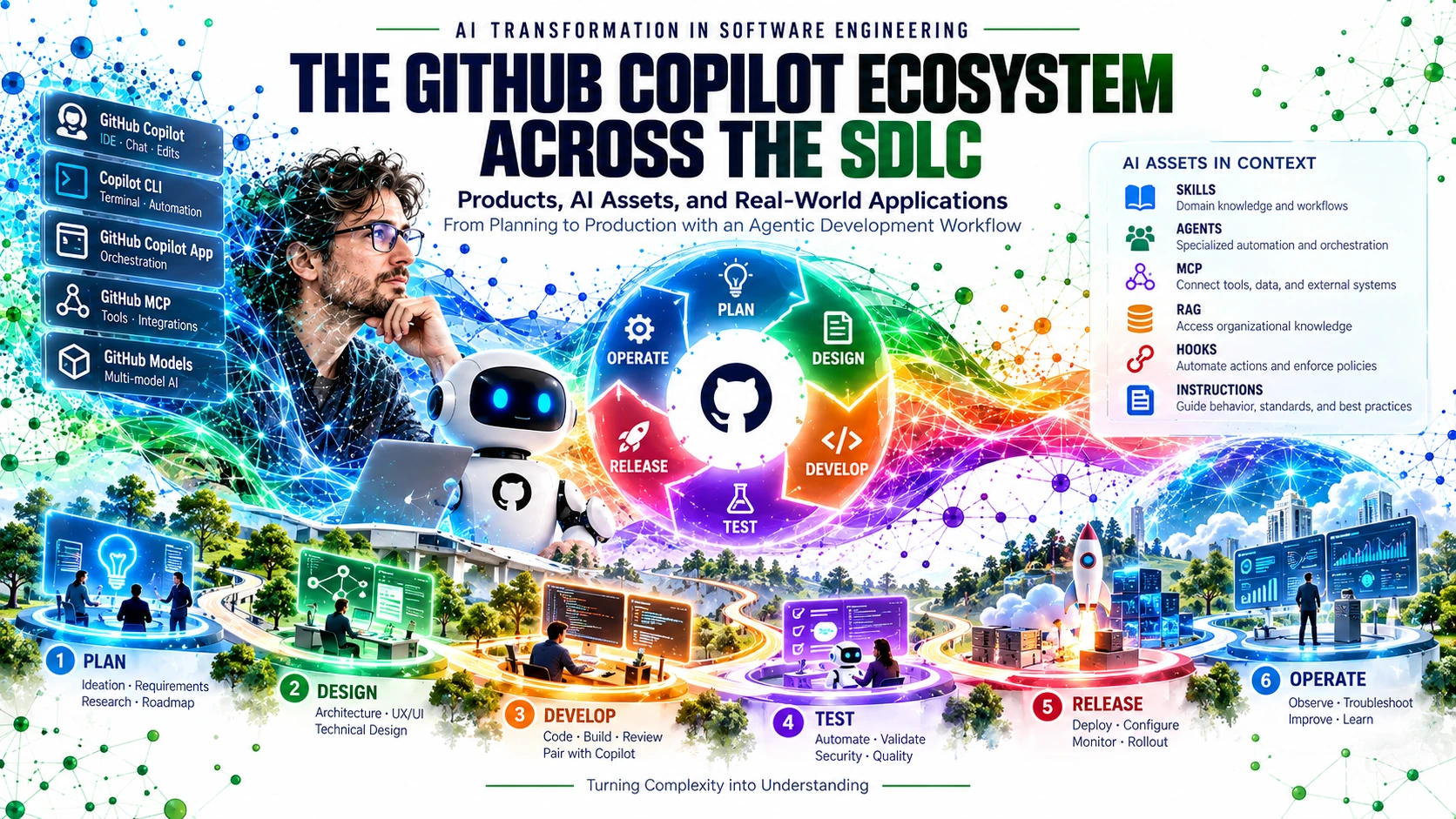
A practical mapping looks like this:
| SDLC phase | GitHub/Copilot surfaces | Useful AI assets | Applied-AI outcome |
|---|---|---|---|
| Discovery & product planning | Copilot Chat, GitHub, Copilot app, SDK experiences | Instructions, RAG, MCP, skills | Themes, requirements, risks, early roadmap |
| Sprint planning & backlog shaping | GitHub, Copilot app, GitHub CLI, Copilot CLI | Skills, agents, instructions, hooks | Stories, criteria, dependencies, sprint plan |
| Architecture & solution design | IDE, Chat, Copilot CLI, SDK apps | RAG, skills, MCP, agents, instructions | ADRs, diagrams, contracts, trade-off exploration |
| Development | IDE Copilot, Copilot CLI, Copilot app, cloud agent | Instructions, skills, agents, MCP | Code, refactors, documentation, delegated implementation |
| Testing & quality engineering | IDE, Copilot CLI, cloud agent | Skills, hooks, RAG, MCP | Tests, edge cases, fixtures, failure analysis |
| Code review, security & compliance | Copilot code review, GitHub.com, IDE, GitHub CLI | Instructions, skills, MCP, hooks | Review findings, policy context, suggested fixes |
| CI/CD, release & deployment | GitHub Actions context, GitHub CLI, Copilot CLI, cloud agent, SDK apps | Hooks, MCP, skills, agents | Workflow authoring, release notes, rollout and rollback assistance |
| Production & incident response | Copilot CLI, Copilot app, custom SDK apps, agents | MCP, RAG, skills, agents, hooks | Correlation, runbook retrieval, investigation, guided remediation |
| Feedback & continuous improvement | GitHub, Copilot app, SDK apps, Chat | RAG, memory, agents, skills | Learning captured into backlog, docs, playbooks and new assets |
This table describes Applied AI.
When the same assets become shared across repositories, governed at organization or enterprise level, connected to standardized knowledge, and measured against engineering outcomes, the organization begins moving toward AI Transformation.
What each AI asset actually does
The names overlap enough that teams often ask whether they are interchangeable. They are not.
Instructions — the persistent “how we work”
Instructions encode stable guidance such as coding conventions, architecture constraints, testing expectations, build commands, security requirements, and repository context.
Skills — reusable procedures with domain knowledge
GitHub describes agent skills as reusable folders of instructions, scripts, and resources that can be loaded for specialized tasks. A skill is useful when a capability should be repeatable across work: reviewing a Rails migration, creating an ADR, performing a threat-model pass, or preparing a release.
Custom agents — specialized responsibility
Custom agents package expertise, prompts, tool permissions, and optionally MCP integrations. They are useful when responsibility itself should be reusable: architecture agent, test-design agent, security reviewer, or incident investigator.
MCP — access to tools and external systems
MCP lets agents use tools and data sources beyond the immediate repository. It can expose issue trackers, CI/CD systems, databases, observability tools, documentation systems, browsers, and internal services.
Hooks — deterministic control points
Hooks execute commands at defined agent lifecycle points. They can automate tests, validation, security checks, logging, policy enforcement, or other deterministic operations.
Memory — persistent context where supported
Copilot Memory stores useful repository facts and preferences so the system can avoid reconstructing all context from scratch in every session. It should complement, not replace, canonical documentation and policy.
Plugins — distributable customization bundles
Copilot CLI plugins package multiple customization components so teams can distribute reusable behavior more conveniently.
SDK — Copilot as a building block
The Copilot SDK lets teams build custom Copilot-powered applications. It supports programmatic sessions and capabilities such as custom agents, MCP integrations, hooks, skills, and observability.
RAG — knowledge retrieval architecture
RAG is not a GitHub-specific file or Copilot product. It is an architecture for finding relevant knowledge and placing that context into an AI task.
RAG is knowledge; MCP is access
This distinction deserves its own section because the two are often treated as synonyms.
They are not.
A RAG system can index multiple repositories, architecture documents, incidents, standards, product knowledge, and runbooks. It performs retrieval so the AI receives a focused slice of that knowledge.
MCP can be one way a Copilot surface or agent reaches that RAG system.
RAG = knowledge retrieval architecture
MCP = protocol for exposing tools and context
A RAG system does not inherently require MCP. It may be embedded in an application, exposed through an API, or integrated into a custom Copilot SDK application.
Conversely, an MCP server does not need to expose RAG. It may expose a deployment API, issue tracker, observability query, database, browser, or another tool.
For a product composed of many repositories, this becomes especially useful: local repository assets can express local truth while a cross-repository knowledge service supplies product-wide context.
From local customization to organizational capability
An AI asset has a scope.
Some assets belong inside a repository because they describe local reality. Others represent shared organizational capability.
Current Copilot CLI documentation supports custom agents at user, repository, organization, and enterprise scopes, which makes this distinction practical rather than purely conceptual.
A useful pattern is:
- keep repository truth beside the repository;
- publish shared skills and agents at organization or enterprise scope where supported;
- package reusable CLI customizations as plugins;
- expose external capabilities through shared MCP services;
- centralize cross-repository knowledge behind search/RAG services;
- use the Copilot SDK when the organization needs a purpose-built workflow or application.
The architectural principle is:
Centralize what represents shared organizational capability; localize what represents repository truth.
That is one of the bridges from isolated Applied AI to AI Transformation.
Hooks, review, and the return of determinism
The more work we delegate to agents, the more valuable deterministic control becomes.
A model can propose a deployment sequence; a hook can require tests before proceeding.
A model can review a change; branch protection can still require human approval.
A model can interpret a security rule; a scanner can still return an objective result.
A model can suggest a rollback; production telemetry can still determine whether the system recovered.
Probabilistic layer:
reason · explore · summarize · propose · adapt

Deterministic layer:
validate · enforce · record · approve · measure
GitHub’s hooks documentation explicitly supports lifecycle hooks in Copilot CLI and Copilot cloud agent. Copilot code review can also use custom instructions, agent skills, and configured MCP context, but its output remains evidence to validate rather than an unquestionable approval.
An AI Transformation should therefore not remove engineering controls.
It should make those controls discoverable, invocable, explainable, and reusable by agents.
From AI-assisted to AI-native
A useful maturity progression is:
- AI-assisted — individuals use completion, Chat, and ad hoc prompts.
- Contextualized — repositories teach Copilot through instructions, skills, and structured knowledge.
- Agentic — bounded tasks are delegated through Copilot CLI, the Copilot app, cloud agent, custom agents, and MCP-connected tools.
- Governed — hooks, permissions, review, CI and human checkpoints constrain execution.
- Learning — production, incidents, review findings, and engineering metrics feed better context and reusable assets into the next cycle.
Applied AI may happen at any one of these stages.
AI Transformation begins when the organization deliberately connects them.
The series roadmap
The companion infographic is intentionally structured as a future series. This introductory post provides the map; the next posts can zoom into each phase.
- Discovery & Product Planning
- Sprint Planning & Backlog Shaping
- Architecture & Solution Design
- Development & AI Pair Programming
- Testing & Quality Engineering
- Code Review, Security & Compliance
- CI/CD, Release & Deployment
- Production, Monitoring & Incident Response
- Feedback, Learning & Continuous Improvement
Every post can ask the same five questions:
- Which Copilot product/surface is appropriate here?
- Which AI assets should be reusable?
- Which knowledge must be retrieved?
- Which controls and human decisions must remain explicit?
- Which evidence should feed the next cycle?
Closing the loop
A software lifecycle is already a feedback system.
AI makes that loop potentially much tighter.
Production telemetry can become investigation context. Incidents can become runbooks and new tests. Review findings can become skills or instructions. Repeated agent failures can become hooks. Product feedback can become backlog evidence. Architecture decisions can become retrievable context for the next implementation.
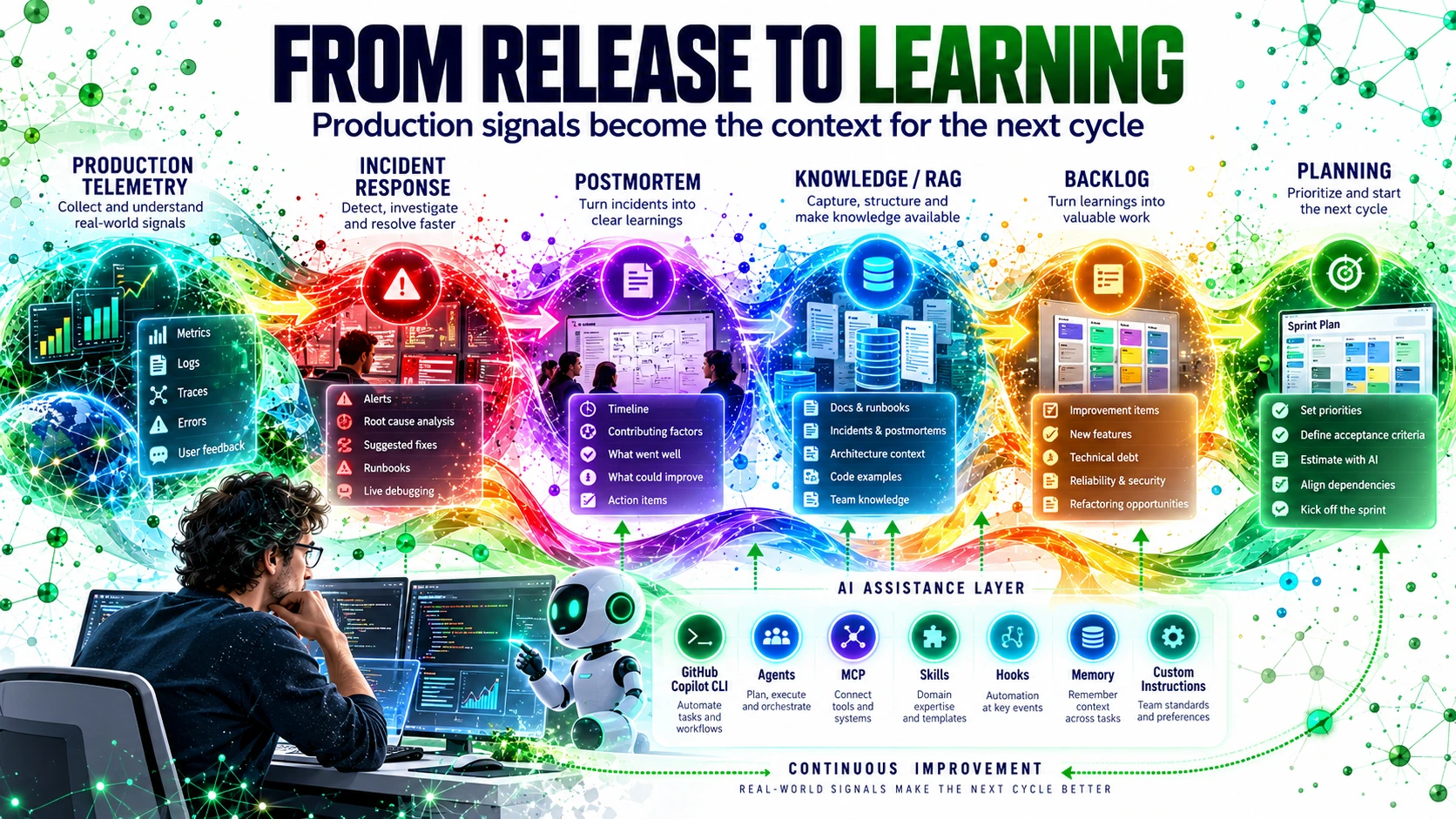
The model can now be stated more precisely:
Applied AI improves individual activities. AI Transformation connects those applications into a shared organizational capability.
People define intent. Copilot products provide execution surfaces. AI assets encode reusable capability. Knowledge systems provide context. Controls preserve trust. Evidence creates learning.
That is where GitHub Copilot becomes more than a coding assistant.
It becomes part of the architecture of software delivery.
References
-
GitHub Docs — About GitHub Copilot CLI
https://docs.github.com/en/copilot/concepts/agents/copilot-cli/about-copilot-cli -
GitHub Docs — Customize GitHub Copilot CLI
https://docs.github.com/en/copilot/how-tos/copilot-cli/customize-copilot -
GitHub Docs — Overview of customizing GitHub Copilot CLI
https://docs.github.com/en/copilot/how-tos/copilot-cli/customize-copilot/overview -
GitHub Docs — GitHub Copilot CLI hooks
https://docs.github.com/en/copilot/how-tos/copilot-cli/customize-copilot/use-hooks -
GitHub Docs — GitHub Copilot hooks reference
https://docs.github.com/en/copilot/reference/hooks-reference -
GitHub Docs — About the GitHub Copilot app
https://docs.github.com/en/copilot/concepts/agents/github-copilot-app -
GitHub Docs — GitHub Copilot app guides
https://docs.github.com/en/copilot/how-tos/github-copilot-app -
GitHub Docs — GitHub Copilot cloud agent
https://docs.github.com/en/copilot/how-tos/use-copilot-agents/cloud-agent -
GitHub Docs — Use Copilot cloud agent from GitHub CLI
https://docs.github.com/en/copilot/how-tos/use-copilot-agents/cloud-agent/use-cloud-agent-from-cli -
GitHub Docs — About GitHub Copilot code review
https://docs.github.com/en/copilot/concepts/agents/code-review -
GitHub Docs — Use GitHub Copilot code review
https://docs.github.com/en/copilot/how-tos/copilot-on-github/use-copilot-agents/copilot-code-review -
GitHub Docs — Copilot SDK
https://docs.github.com/en/copilot/how-tos/copilot-sdk -
GitHub Docs — Copilot SDK features
https://docs.github.com/en/copilot/how-tos/copilot-sdk/features -
GitHub Docs — Copilot Chat in the IDE
https://docs.github.com/en/copilot/how-tos/chat-with-copilot/chat-in-ide -
Model Context Protocol
https://modelcontextprotocol.io/ -
GitHub Blog — Project HydraFusion: Frontier quality via multi-model orchestration
https://github.blog/ai-and-ml/github-copilot/project-hydrafusion-frontier-quality-via-multi-model-orchestration/ -
Companion infographic — AI Across the SDLC with GitHub Copilot
Download the 10-page PDF